Airflow Fundamentals 101: How Data Cooling Actually Works
Summary
Cooling in an air-cooled data center is not about how much cold air you produce. It’s about whether that air actually does its job. Cold air must reach server inlets. Hot air must leave without mixing back in. When that balance breaks—even in small ways—cooling performance becomes inconsistent, inefficient, and hard to trust. This guide walks through how air actually moves through a facility. Not in theory, but in practice.
The goal is simple: understand airflow well enough to see where it fails.
The Cooling Loop
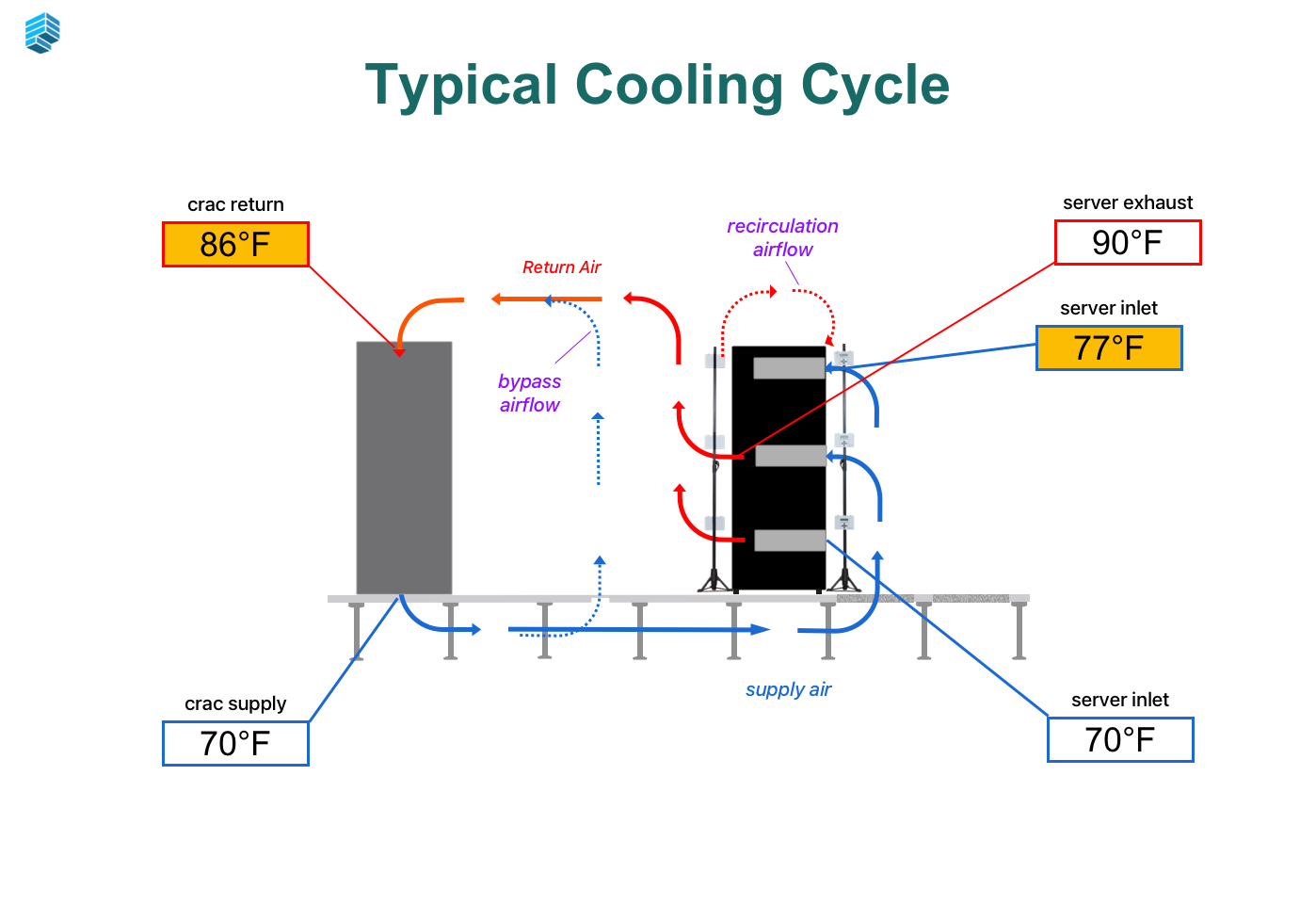
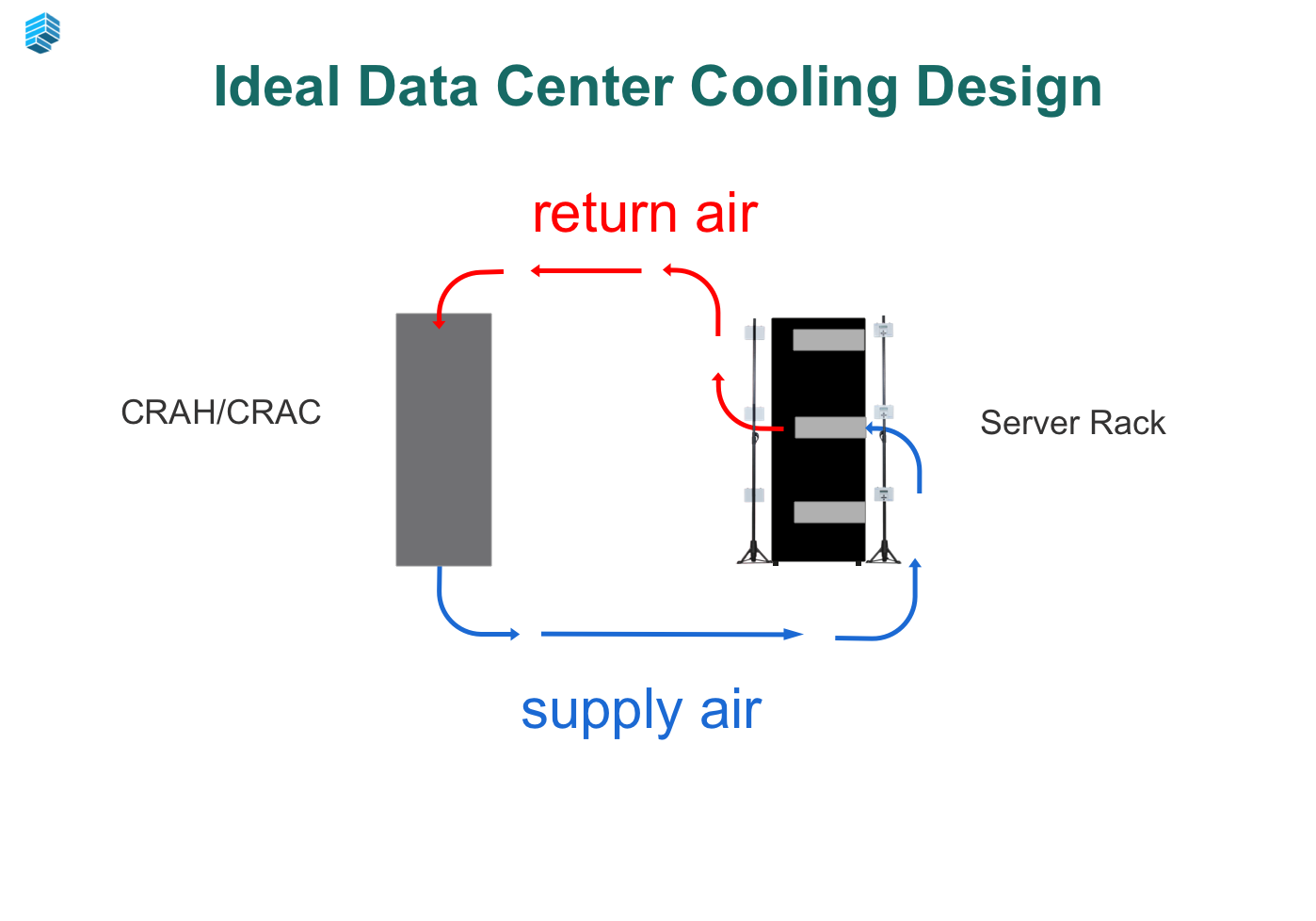
At its simplest, data center cooling is a loop:
Cooling units produce cold air
Cold air reaches server inlets
Servers heat the air
Hot air returns to cooling units
That’s it. A continuous cycle.
When this loop works, cooling is stable and predictable. Air goes where it’s supposed to go, temperatures stay consistent, and the system behaves logically.
When this loop breaks, everything else starts to drift. You may still have enough cooling capacity, but it’s no longer being used effectively.
Most facilities don’t have a capacity problem. They have a loop problem.
The Two Problems That Break the Loop
Bypass Air: Cold Air That Does No Work
Bypass air is cold air that never reaches servers.
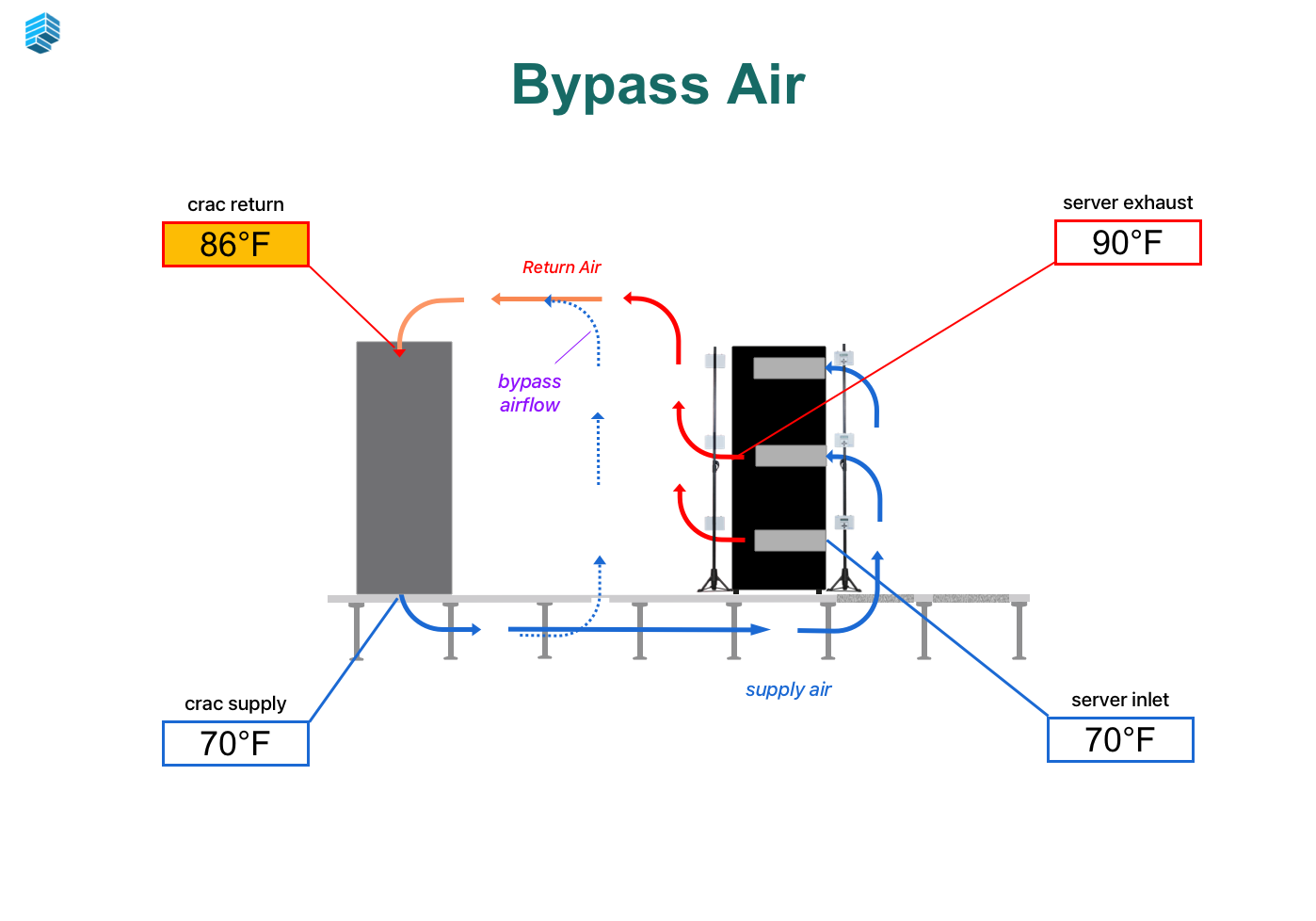
Instead of moving through equipment, it takes an easier path—flowing directly from supply to return. This happens through gaps in racks, open floor tiles, missing blanking panels, or poorly sealed containment.
The system is still producing cold air, but a portion of it is effectively wasted.
The impact is subtle but significant:
Cooling units work harder than necessary
Some racks receive less airflow than expected
Overall efficiency drops
The more bypass you have, the less control you have over where cooling is actually applied.
Recirculation: Hot Air That Comes Back
Recirculation is the opposite problem.
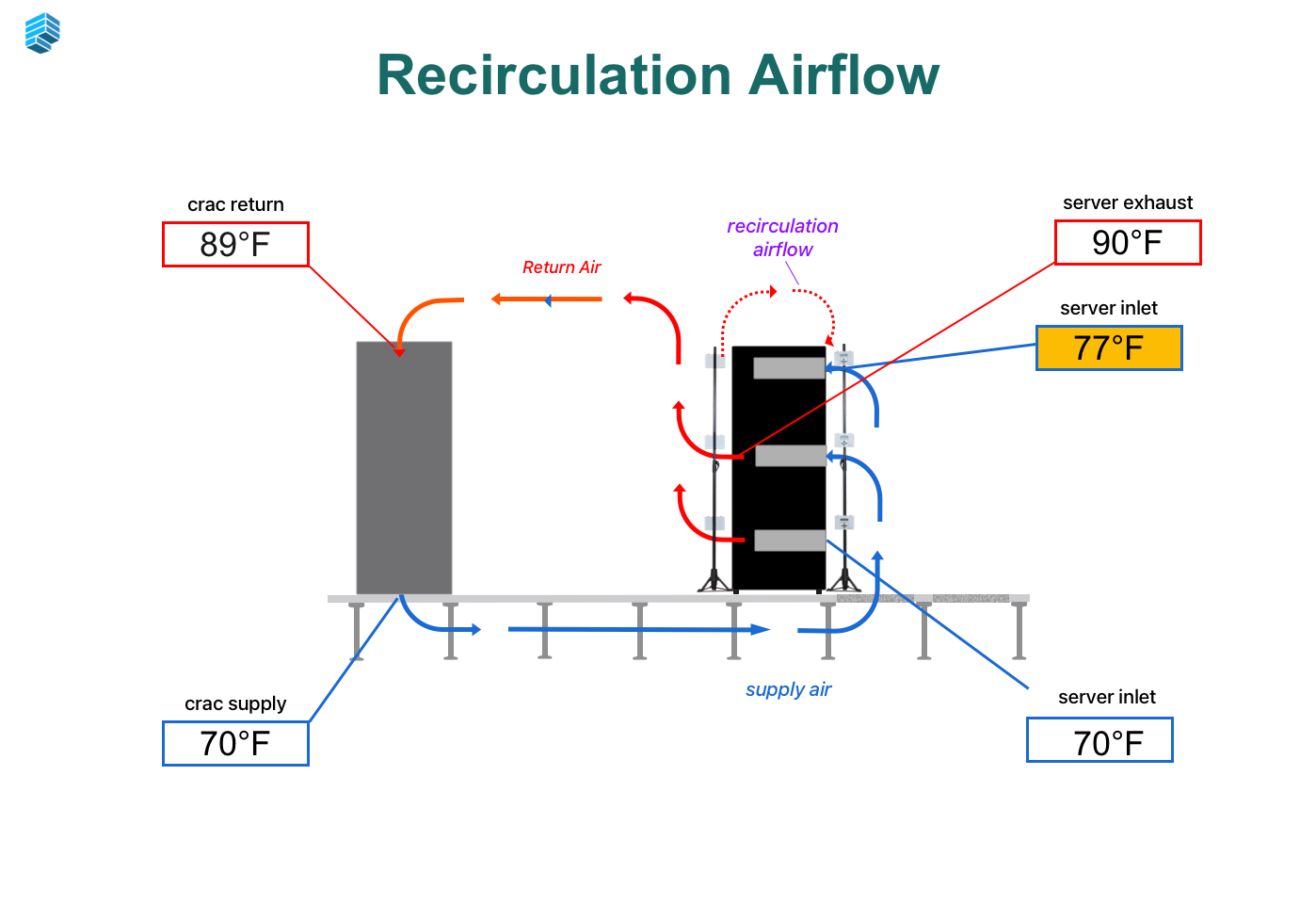
Hot exhaust air leaves the back of the rack but doesn’t make it back to the cooling unit. Instead, it finds its way into the cold aisle and mixes with supply air.
Now servers are pulling in warmer air than intended.
This leads to:
Higher inlet temperatures
Localized hot spots
Temperature variability across racks
Unlike bypass, which wastes cooling, recirculation actively degrades it. It changes the quality of the air reaching servers.
The Reality
Most environments have both.
Bypass reduces how much cooling reaches servers
Recirculation increases the temperature of the air that does
Together, they create a system that looks functional—but behaves inconsistently.
Airflow in a data center is not one continuous stream—it’s a mix of different air paths, each with a specific role. Most cooling issues start when these paths are misunderstood or, more often, mixed together. The four key terms to learn are: supply air, return air, bypass air and recirculation airflow.
Why Airflow Direction Matters
The cooling loop only works if airflow is directional.
Cold air is meant to move from the front of the rack to the back. Hot air is meant to move away from the servers and back to the cooling units.
When that direction is maintained, airflow is predictable.
When it isn’t, airflow becomes chaotic and results in alerts, alarms and issues.
Air will always follow the path of least resistance. If there are gaps, it will move sideways. If containment is incomplete, hot air will spill into cold aisles. In some cases, air loops form between racks, where hot and cold air continuously mix without ever completing the cycle.
Once airflow loses direction, the system stops behaving like a loop and starts behaving like a collection of local conditions.
Why Small Details Have a Big Impact
Airflow management is where theory meets execution. Small physical details—missing blanking panels, open cable cutouts, gaps between cabinets—have an outsized impact on performance. These issues allow cold and hot air to mix before it ever reaches the servers, creating inefficiencies that no amount of additional cooling can fix.
These conditions are common and easy to overlook. A single gap may seem insignificant, but across rows and rooms, they add up.
Air does not need large openings to escape or mix. It only needs an easier path.
The result is a system where airflow is no longer controlled, even if the infrastructure itself is well-designed.
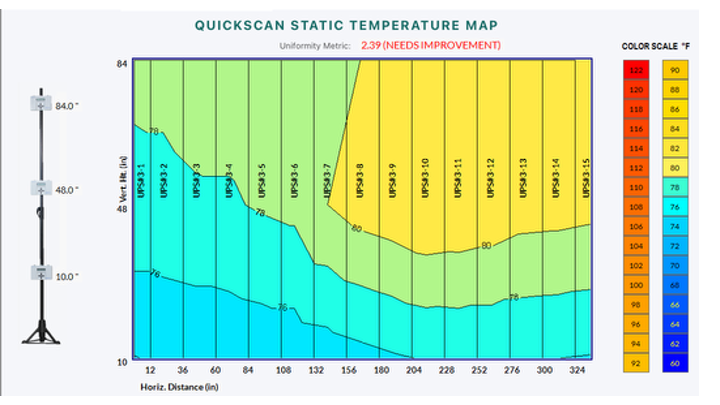
Why Average Temperature Doesn’t Tell the Full Story
Most facilities rely on a small number of sensors or average temperature readings. These metrics are easy to monitor, but they don’t reflect how airflow behaves at the rack level.
Airflow problems are localized.
You can have:
One rack running hot
Another overcooled
Another behaving as expected
All within the same row.
The average temperature may look stable, but it hides variation. That variation is where most issues exist.
This is why temperature alarms can feel inconsistent. The system is not failing uniformly—it is failing unevenly.
What Good Airflow Actually Looks Like
A well-functioning airflow environment is not perfect, but it is controlled. Cold air consistently reaches server inlets. Hot air returns without mixing. Temperature conditions are stable across racks, not just acceptable on average. There is a clear separation between cold and hot air paths. Racks are sealed, containment is consistent, and airflow follows a predictable direction. Most importantly, the system behaves the way you expect it to. Changes in load result in understandable changes in temperature. Cooling adjustments have a measurable and consistent impact.That predictability is what defines good airflow—not just lower temperatures, but confidence in how the system performs.
Final Takeaway
Airflow is invisible, but it determines everything about cooling performance. If cold air does not reach servers, or hot air does not leave cleanly, the system cannot perform as intended—no matter how much cooling you are providing or how many CRAC/H units you have running. Understanding airflow fundamentals changes how you approach cooling. It shifts the focus from adding more equipment to controlling how air moves through the space.And once you understand that, most cooling issues stop being mysterious. They become visible—and fixable.
Next Steps
If you want to understand where your facility stands, there are two simple ways to start:
Take the Keep It Cool Quiz
Get a quick snapshot of your cooling risk and where airflow issues may exist.Run a Quick Airflow Audit Checklist
Walk your space and confirm whether common airflow problems—like bypass and recirculation—are present.
Both take a few minutes. Both will give you a clearer picture of what’s actually happening in your environment.
Sources & References
ASHRAE TC 9.9 – Thermal Guidelines for Data Processing Environments
Uptime Institute – Airflow Management in Data Centers
U.S. Department of Energy – Data Center Energy Efficiency Best Practices
Patterson, M.K. (2008). The Effect of Data Center Temperature on Energy Efficiency
DOI: 10.1109/ITHERM.2008.4544318
Want to Learn More on Airflow Management?
Check out these other Keep your Cool Articles or visit our learning resources page.