
Airflow problems are not unique to raised-floor data centers.
A slab-floor room can have many of the same problems: poor air distribution, recirculation, mixing, bypass airflow, and hot spots. The air just gets from the cooling unit to the rack by a different route.
Most operators already monitor temperature throughout the room. The problem is that a temperature reading only tells you what is happening at that point. It does not tell you how the air got there, or what happened to it along the way.
That is where the Four Delta-Ts are useful.
A Delta-T is simply the difference between two temperatures. Measure it at four points in the cooling loop and you can start following the heat through the room:
Cooling unit → supply air → IT equipment → return air → cooling unit
Whether the room uses raised floor, overhead ductwork, in-row cooling, or open slab, the basic job is the same: get cool air to the IT equipment, carry the heat away, and return that heat to the cooling unit.
1. Cooling Unit Delta-T
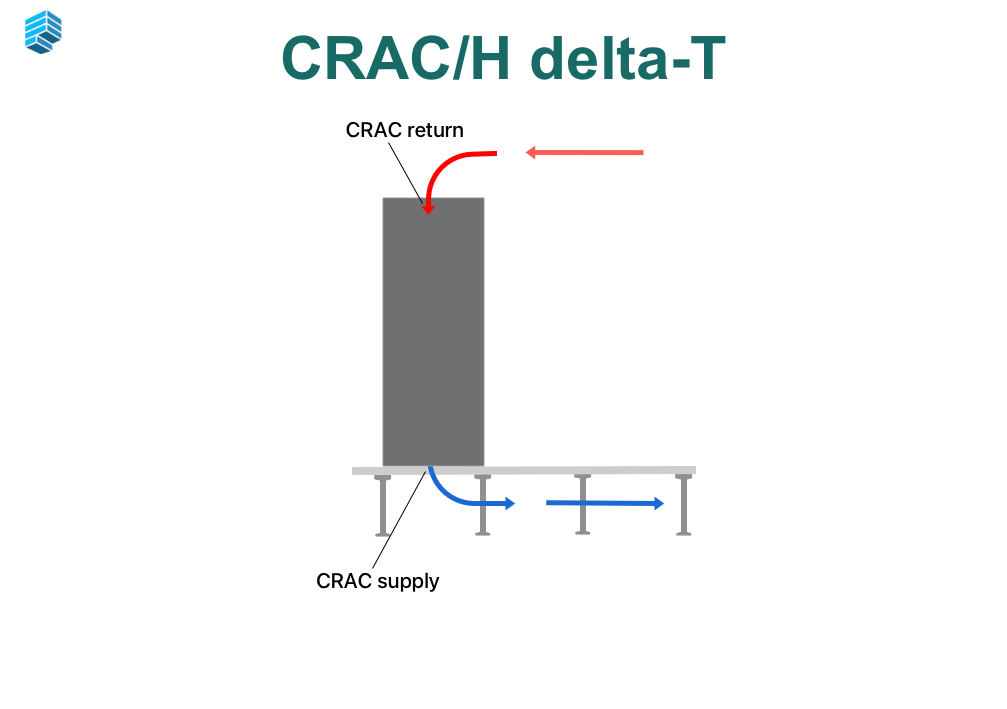
Return air temperature minus supply air temperature.
This is probably the Delta-T most facilities teams already know. It shows how much temperature drops across the cooling unit. It is useful, but it only tells you what is happening at the cooling unit.
You can have a perfectly reasonable Delta-T at the CRAC or CRAH while racks on the other side of the room are still running warm. The cooling unit may be working exactly as intended. The problem may be everything that happens between the unit and the rack.
2. Server Delta-T
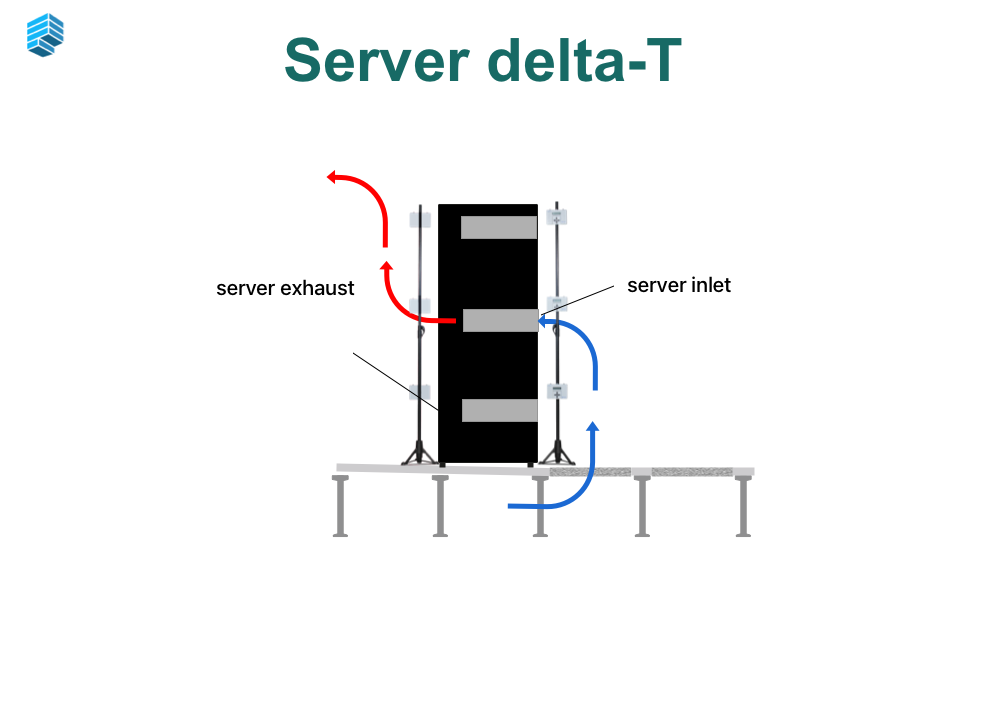
Server exhaust temperature minus server inlet temperature.
This tells you how much the IT equipment heats the air moving through it.
A heavily loaded rack will generally produce a larger temperature rise than a lightly loaded rack with similar airflow. But there is no universal “correct” Server Delta-T.
It depends on load, server airflow, equipment configuration, and inlet temperature.
The number becomes more useful when you compare racks. If two racks with similar loads behave very differently, that is worth investigating. It can also help make sense of rooms where rack densities vary substantially.
3. Supply Air Delta-T
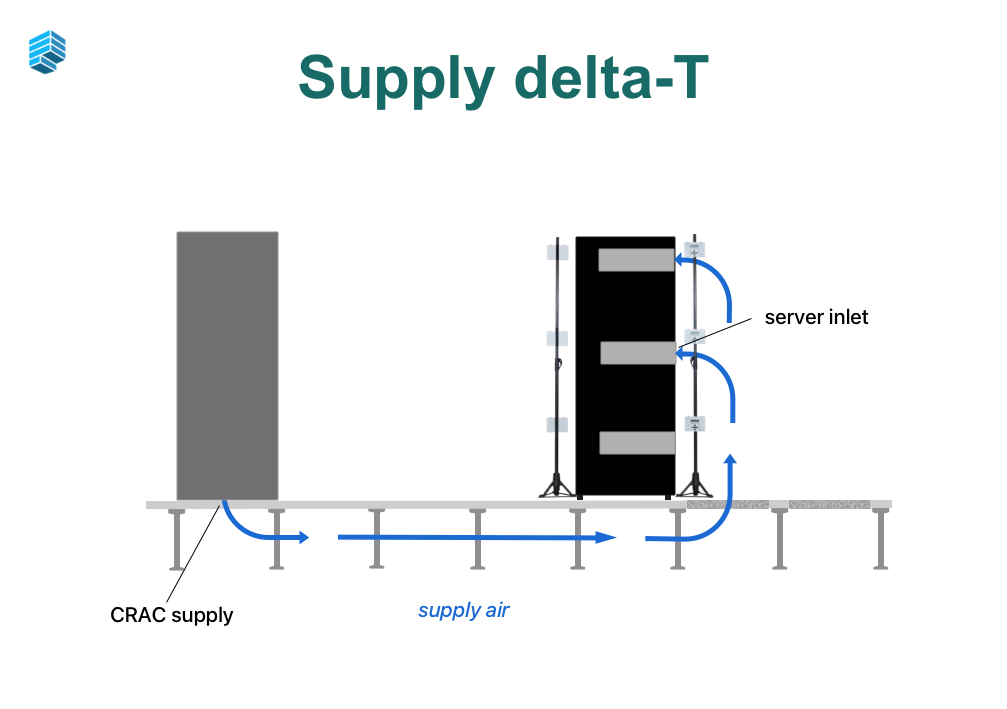
The difference between the supply air temperature at the cooling unit and the temperature at the server inlet.
This is where you see what happens to the cold air on its way to the equipment.
Air may leave the cooling unit at 65°F and arrive at the server considerably warmer. If that happens, something changed between those two points.
Maybe the air mixed with warmer room air. Maybe containment is leaking. Maybe airflow is being blocked. Maybe the air is stratifying before it reaches the rack.
The Supply Air to Server Inlet Delta-T helps quantify that change.
Where you look next depends on the room:
Raised floor: underfloor obstructions, cable openings, perforated-tile placement, and uneven static pressure.
Slab floor: diffuser placement, duct layout, throw distance, and stratification.
Different delivery systems. Same question: how much did the supply air change before it reached the servers?
4. Return Air Delta-T
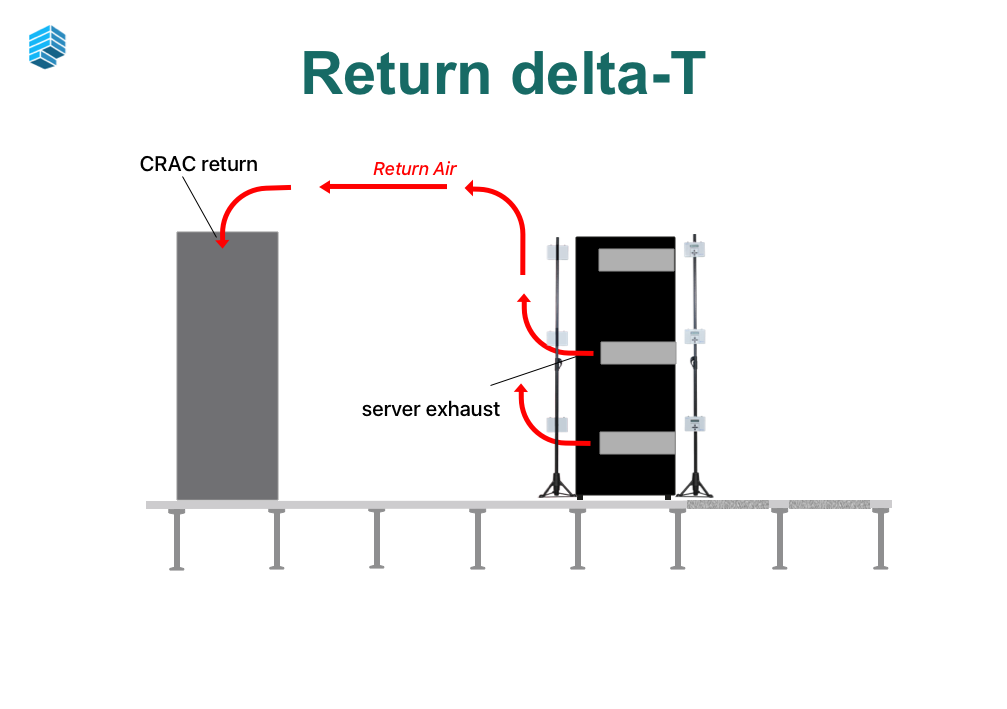
Server exhaust temperature minus cooling unit return temperature.
Now follow the hot air back.
Ideally, the air leaving the servers makes its way directly to the cooling unit return. Real rooms are rarely that cooperative.
Hot exhaust may recirculate into server inlets. It may mix with supply air. It may collect above racks or get trapped in parts of the room with poor return paths.
If the air leaving the racks is significantly warmer than the air arriving back at the cooling unit, some of that heat was lost along the way.
That difference is the clue.
The useful part is reading all four together
Any one Delta-T gives you a piece of the picture. The real value comes from comparing them together. Basically, if the cooling-unit Delta-T looks normal but server inlets are warm, the unit probably is not your first problem.
If supply air leaves the unit cold but arrives warm at the rack, look at the delivery path. If rack exhaust is hot but the return temperature at the cooling unit is much lower, look at the return path and mixing. The numbers help narrow the search.
And the questions are the same whether the room has a raised floor or a slab:
Where is the cold air going?
Where is the hot air going?
Where are the two mixing?
Where is air bypassing the IT load?
Where is hot air coming back into the server inlet?
Those are airflow questions. The floor type is just part of the plumbing.
A hot rack does not automatically mean you need more cooling
When a rack gets hot, adding cooling capacity can feel like the obvious answer.
Sometimes it is.
But first, make sure the cooling capacity you already have is actually reaching the rack.
A room can have enough total cooling and still have hot spots because the air is poorly distributed. Adding more capacity to that room may increase cost without fixing the underlying problem.
Read the Four Delta-Ts Together
Each Delta-T gives you information about one part of the cooling loop, but they become much more useful when you look at them together. If one temperature difference looks unusual compared with the others, you can start narrowing down where the problem may be occurring.
For example, the cooling unit may have a normal Delta-T while server inlet temperatures remain high. In that case, the cooling unit itself may be operating correctly, but the supply air is not reaching the IT equipment as intended. If the air leaving the servers is much warmer than the air returning to the cooling unit, there may be mixing, recirculation, or another problem with the return path.
This is why airflow problems need to be looked at as a complete system. Whether the data center uses a raised floor, slab floor, overhead ducts, or in-row cooling, the same basic principles apply. Cold air needs to reach the IT equipment, and the hot exhaust air needs to return to the cooling system without mixing back into the supply air or bypassing the intended path.
A Hot Spot Is Not Always a Capacity Problem
When a rack is running hot, it is easy to assume that the room needs more cooling. Sometimes that is the case, but it is worth first checking whether the cooling capacity already available is actually reaching the rack.
We have seen many data centers with enough total cooling capacity, but poor airflow distribution. Adding another cooling unit may increase available capacity without correcting the underlying problem. Measuring the supply temperature, server inlet temperature, server exhaust temperature, and return temperature helps determine whether the problem is capacity or airflow.
Measure Before Making Changes
Data centers change continuously. New racks are added, IT loads increase, containment is installed, floor tiles are moved, and equipment is replaced. Any one of these changes can affect airflow within the room. Over time, the cooling conditions in a data center can look very different from what was originally designed or commissioned.
This is one reason we recommend periodically measuring conditions at the rack level. A BMS or DCIM system provides valuable information about the cooling equipment and environmental conditions, but it can only report what is happening where sensors are installed. As we have discussed before, there are limits to what BMS data alone can tell you.
A thermal assessment adds another level of information by measuring temperatures throughout the data hall and at the racks themselves. The resulting heat maps make it easier to identify hot spots, cold spots, uneven supply temperatures, and areas where hot air may be recirculating. We used this approach to identify the cause of an overheating problem in a hyperscale PSU room, where the issue was not obvious from the facility monitoring system alone.
Thermal measurements are also useful after airflow changes have been made. Rather than assuming a new containment system, tile arrangement, or cooling adjustment improved the room, operators can measure the conditions before and after the change and see whether it actually worked.
The Four Delta-Ts provide a simple framework for understanding where heat is moving through the cooling loop and where airflow may be breaking down. Once you know which part of the loop needs attention, a rack-level thermal assessment can help identify what is actually happening in that area.
If you are trying to understand how heat is moving through your data center, you can learn more about our Purkay Labs Thermal Assessment.