
How Data Center Cooling Actually Works
A Practical Guide to Airflow and Delta-T
1. Introduction — Cooling Is About Moving Heat
Data center cooling is often described as “keeping the room cold.” In reality, cooling systems are designed to remove heat from servers and carry it away from the data hall. The goal is not cold air—it is controlled heat transport.
Every server converts electrical power into heat. That heat must be captured by airflow, transported through the room, and returned to cooling units where it can be rejected outside the facility.
Understanding this basic principle helps explain why many cooling problems occur even when plenty of cooling equipment is installed.
Key idea: Cooling efficiency depends on airflow management and temperature differences (Delta-T), not simply the amount of cooling equipment available.
2. The Airflow Loop in a Data Center
To understand cooling performance, it helps to think of airflow as a continuous loop.

Step 1 — Cooling Units Produce Supply Air

Cooling units (CRACs, CRAHs, or other systems) deliver conditioned supply air into the data hall. This air is typically delivered through:
raised floor tiles
overhead ducts
contained cold aisles
The supply air carries the cooling capacity needed to absorb heat from IT equipment.
Step 2 — Servers Pull Air Through Equipment (Server delta-T)
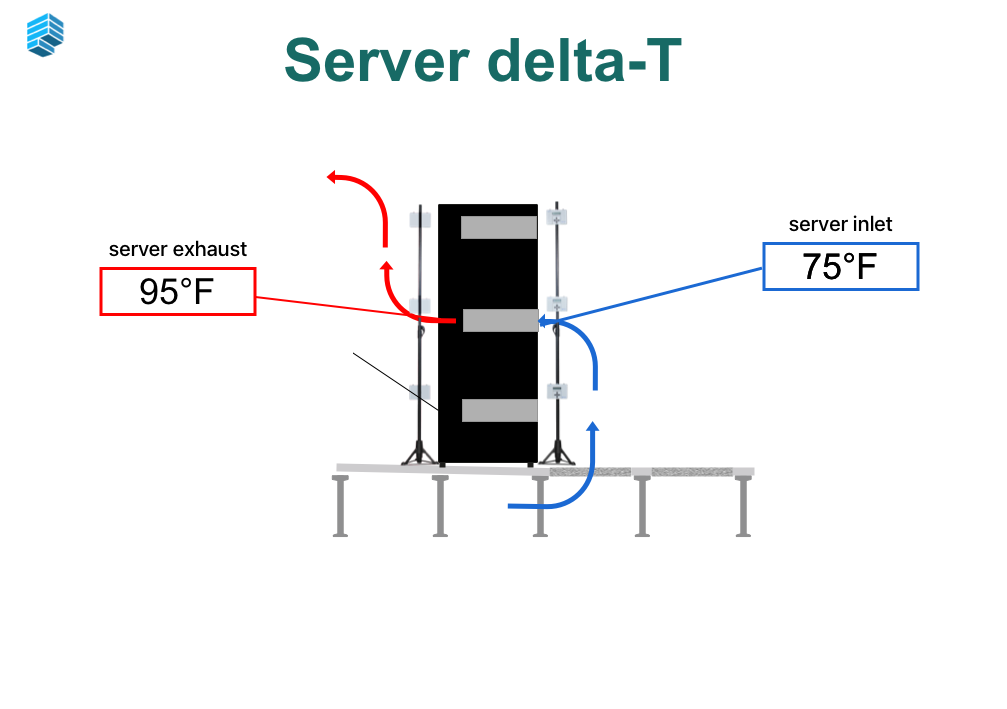
Servers use internal fans to pull air through the chassis.
Air enters at the server inlet, passes across internal components, and exits as heated exhaust air.
Because servers draw air actively, they determine how airflow moves through the rack.
Step 3 — Hot Air Returns to Cooling Units
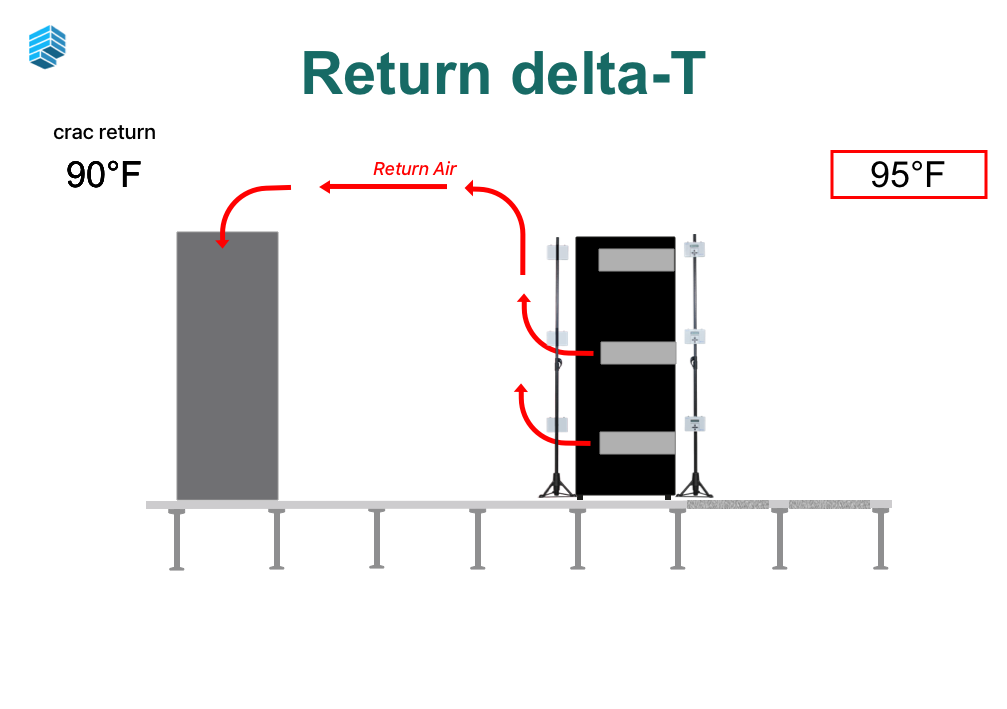
After leaving the servers, warm air moves toward the return path of the cooling system. This air eventually returns to cooling units where the heat is removed.
Return air may travel through:
hot aisles
ceiling plenums
return ducts
open room air
Once the heat is removed, the cycle repeats.
Step 4 — Hot Air Pulls through the CRAC Unit
After the hot air returns to the CRAC unit, it is pulled through the CRAC unit and cooled.
The Complete Airflow Loop
Cooling Unit → Supply Air → Server Inlet → Server Exhaust → Return Air → Cooling UnitIf airflow follows this path cleanly, cooling works efficiently.
If it does not, problems begin to appear.
3. The Four Delta-Ts That Reveal Cooling Performance
Temperature differences—called Delta-T—help operators understand how effectively heat is moving through the system.
1. Supply Air → Server Inlet Delta-T
Measures whether supply air is reaching servers.
A high difference often indicates:
recirculated hot air
poor containment
airflow leaks
2. Server Inlet → Server Exhaust Delta-T
Measures how much heat the server is producing.
Typical server Delta-T values often fall between 15–30°F, depending on load and hardware design.
3. Server Exhaust → Cooling Unit Return Delta-T
Measures how efficiently hot air travels back to the cooling unit.
Low values may indicate:
mixing of hot and cold air
bypass airflow
4. Cooling Unit Return → Supply Delta-T
Shows how effectively cooling equipment removes heat.
Low cooling unit Delta-T may indicate:
overcooling
poor airflow capture
Delta-T values are often the most useful diagnostic signals in a data center cooling system.
4. Why Airflow Distribution Matters More Than Cooling Capacity
Many data centers believe they have a cooling capacity problem when the real issue is airflow distribution.
Cooling equipment may have sufficient capacity, but if cold air cannot reach servers effectively, hot spots will still occur.
Common airflow distribution issues include:
blocked perforated tiles
missing blanking panels
containment leaks
cable openings
uneven rack airflow demand
These issues create stranded cooling capacity—cooling that exists but cannot reach the servers that need it.
In many cases, improving airflow management unlocks cooling capacity without installing additional equipment.
5. Common Misunderstandings About Data Center Cooling
Misunderstanding 1: “More cooling equipment fixes hot spots”
Hot spots are usually caused by airflow imbalance, not a lack of cooling capacity.
Misunderstanding 2: “Cold air equals good cooling”
Cooling works best when there is a clear temperature rise across IT equipment.
Overcooling reduces system efficiency and can hide airflow problems.
Misunderstanding 3: “BMS sensors tell the whole story”
Most facilities measure only a handful of points in the room.
Cooling problems often occur at the rack level, where sensors are sparse.
Misunderstanding 4: “Cooling systems fail suddenly”
Many cooling problems develop gradually due to layout changes, density increases, and airflow disruptions.
Without measurement, these changes can remain invisible.
6. How Heat Actually Moves Through the Data Center
To summarize:
Servers generate heat.
Air carries that heat away.
Cooling systems remove the heat from the air.
The success of this process depends on:
airflow paths
temperature differences
balanced distribution
When airflow paths are clear and Delta-T values behave predictably, cooling systems operate efficiently and reliably.
7. Key Takeaways
After reading this guide, operators should understand:
Supply air is the cooling air delivered into the data hall.
Server inlet air is what servers actually receive.
Server exhaust air carries heat away from IT equipment.
Return air delivers heat back to cooling systems.
Cooling performance depends on how effectively heat moves through this airflow loop.
Understanding these principles provides the foundation for diagnosing airflow problems, identifying cooling risks, and validating system performance.
Not Sure How Your Cooling System Is Performing?
Understanding airflow is the first step. The next question is whether your facility is actually operating the way you expect.
Take our 2-minute Cooling Risk Quiz to see where your data center stands. The quiz evaluates common airflow and cooling patterns found in real facilities and highlights potential risks that may not be visible through standard monitoring systems.
Take the Cooling Risk Quiz →
The results will help you understand whether your data center cooling strategy appears:
Low Risk – airflow is generally well managed
Medium Risk – potential airflow or distribution issues may exist
High Risk – cooling constraints may be limiting performance
Even well-designed data centers can develop airflow issues over time as equipment, densities, and layouts change.
About Purkay Labs
Purkay Labs helps data center operators see how cooling systems actually perform inside a live facility.
While many monitoring systems measure a few points in the room, cooling behavior often varies significantly at the rack level. Purkay Labs developed the AUDIT-BUDDY® platform to provide fast, portable temperature and humidity measurements across an entire data hall.
Operators use these tools to:
identify airflow imbalances
locate hidden hot spots
validate cooling system performance
test resiliency under different operating conditions
Purkay Labs supports colocation providers, hyperscale operators, and enterprise facilities around the world with tools and services designed to improve cooling visibility, efficiency, and reliability.
Learn more about how Purkay Labs helps operators validate cooling performance.
Explore Purkay Labs →